AKFINANCE

AI spend control

Put a ceiling on your AI spend.

Load USD credit, connect the AI API keys you already pay for, and give every seat - each person who spends on AI - a hard budget in dollars. When one of them reaches zero, it stops spending. Spend reports land in your inbox as PDF and CSV.

Start free
  • 0% commission on subscription plans.
  • Top-ups and balances handled by Stripe
  • We do not run any AI models
Demo organizationSeeded data
The budget card of a demo seat, in amber: $45.00 available, $205.00 of $250.00 spent, 82% of the budget.

One seat of the demo organization: amber at the 80% mark, $45.00 left.

Inside the product

Demo organizationSeeded data

Team pool

$700.00

Unassigned, ready for a seat.

Assigned

$945.00

Handed to five seats.

Spent

$555.00

Reconciled with provider usage.

The budget card of a demo seat, in amber: $45.00 available, $205.00 of $250.00 spent, 82% of the budget.

A seat at the 80% mark: amber, and the team leader still has room to move budget. At the limit the request is refused before any provider is charged.

$0.00 left: that seat stops spending. The rest of the organization is not affected.

The problem

The three questions an AI budget raises

They show up the same week the first invoice does.

01

Who is spending our AI budget?
Every call is attributed to a provider, a model and a seat. Top-up, usage and remaining balance are on one screen.

02

Where do the keys live, and who can use them?
Each seat connects its own keys. Nothing spends until the team leader authorizes that key.

03

What happens when the money runs out?
A seat with no budget cannot spend. The request is refused before it reaches the provider, so the money is never spent and there is no invoice to argue about later.

The mechanism

How it works

Four steps, and every step is a screen you will use.

01

Load USD credit

Top up with Stripe. The balance is held in Stripe's customer balance, and every movement is written to your own ledger.

02

Connect your API keys

Add the providers you already pay for. A new key shows as waiting for approval, and charges nothing until the team leader authorizes it.

03

Give every seat a budget

Hand a dollar amount to each seat from the team pool. Green means there is room, amber warns at 80% spent, red is the hard stop.

04

Get the reports

A PDF and a CSV per reporting line, weekly to annual, delivered by email and re-downloadable from the archive.

Start freeCreating the account is free.

Product tour

Four features, and what each one does

Every figure below is a capture of the demo organization running on seeded data. Nothing here is a drawing of a product we do not ship.

    Budget per person

    Give each person a budget. At zero, it stops.

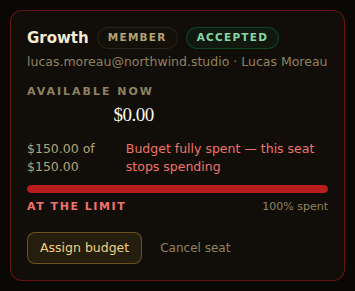
    Each seat holds its own budget in USD. The gauge is amber at 80% spent and red at the limit, and at the limit the spend engine refuses the request before any provider is charged.

    At 80%
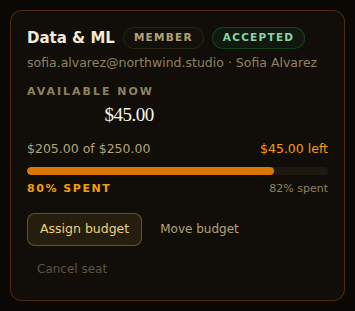
    Seat budget card in amber: $205.00 of $250.00 spent, 82% of the budget, $45.00 left.
    Amber: $45.00 left in the seat of the demo organization, while there is still time to act.
    At the limit
    Seat budget card fully spent: $150.00 of $150.00 used, $0.00 left, marked at the limit.
    Red: $0.00 left. The seat cannot spend again until budget is assigned to it.

    Key authorization

    A new key waits for its team leader.

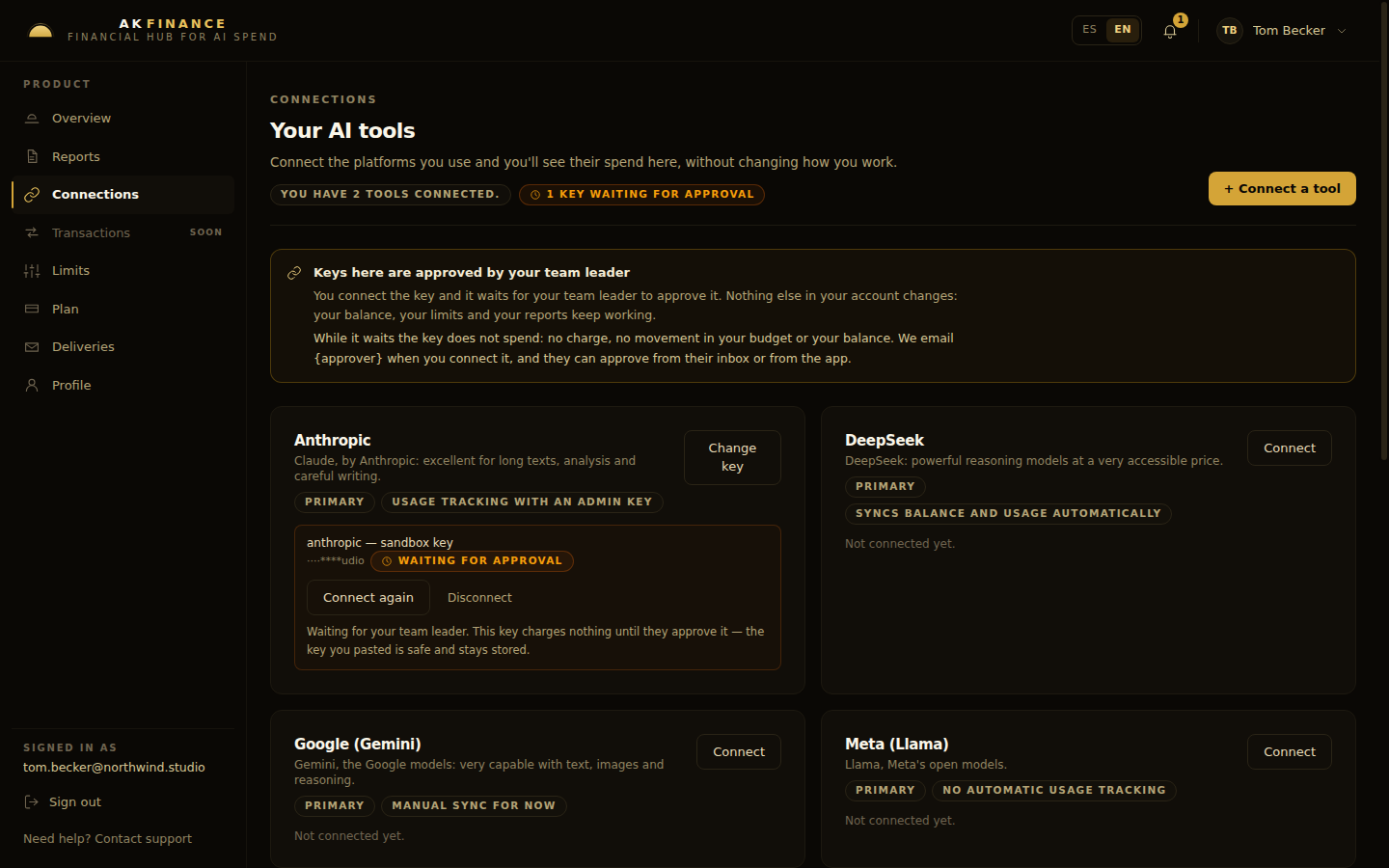
    Keys belong to a seat and are encrypted before they are stored. Until the team leader approves, the key charges nothing; the decision arrives by email and the key can be revoked later.

    Waiting for approval
    A provider key in Connections marked WAITING FOR APPROVAL, with the note that it charges nothing until it is approved.
    Waiting: the key is stored, and it cannot spend.
    The rule, in the app
    Connections: two tools connected and one key waiting for approval, with the rule that the key charges nothing until the team leader approves it.
    The state of the account at a glance: what is connected, and what is waiting for a team leader. Nothing else in the account changes while a key waits.

    Report emails

    The digest lands in the inbox.

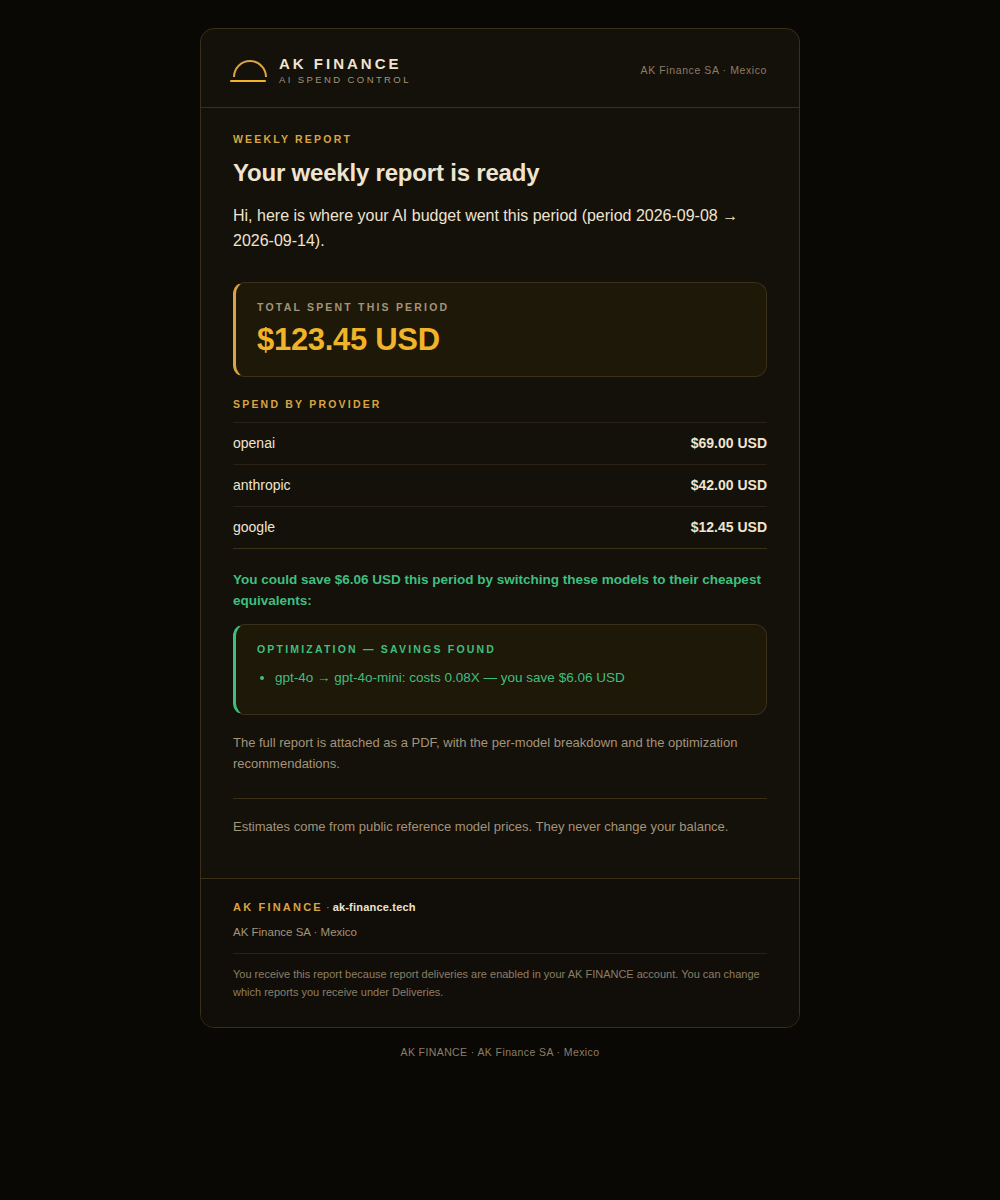
    Weekly, monthly, quarterly or annual, for the team or for the company: the total spent, the split by provider and the model swaps the report found. The PDF and the CSV are attached, and every delivery can be downloaded again from the archive.

    The total
    The weekly report email: total spent this period $123.45 USD, for the period 2026-09-08 to 2026-09-14.
    The period and the amount, in USD.
    The split
    The same email: spend by provider openai $69.00, anthropic $42.00, google $12.45, with a savings found panel.
    What each provider took, and the saving the report found.

    Spend dashboard

    Where the money went, by provider and by model.

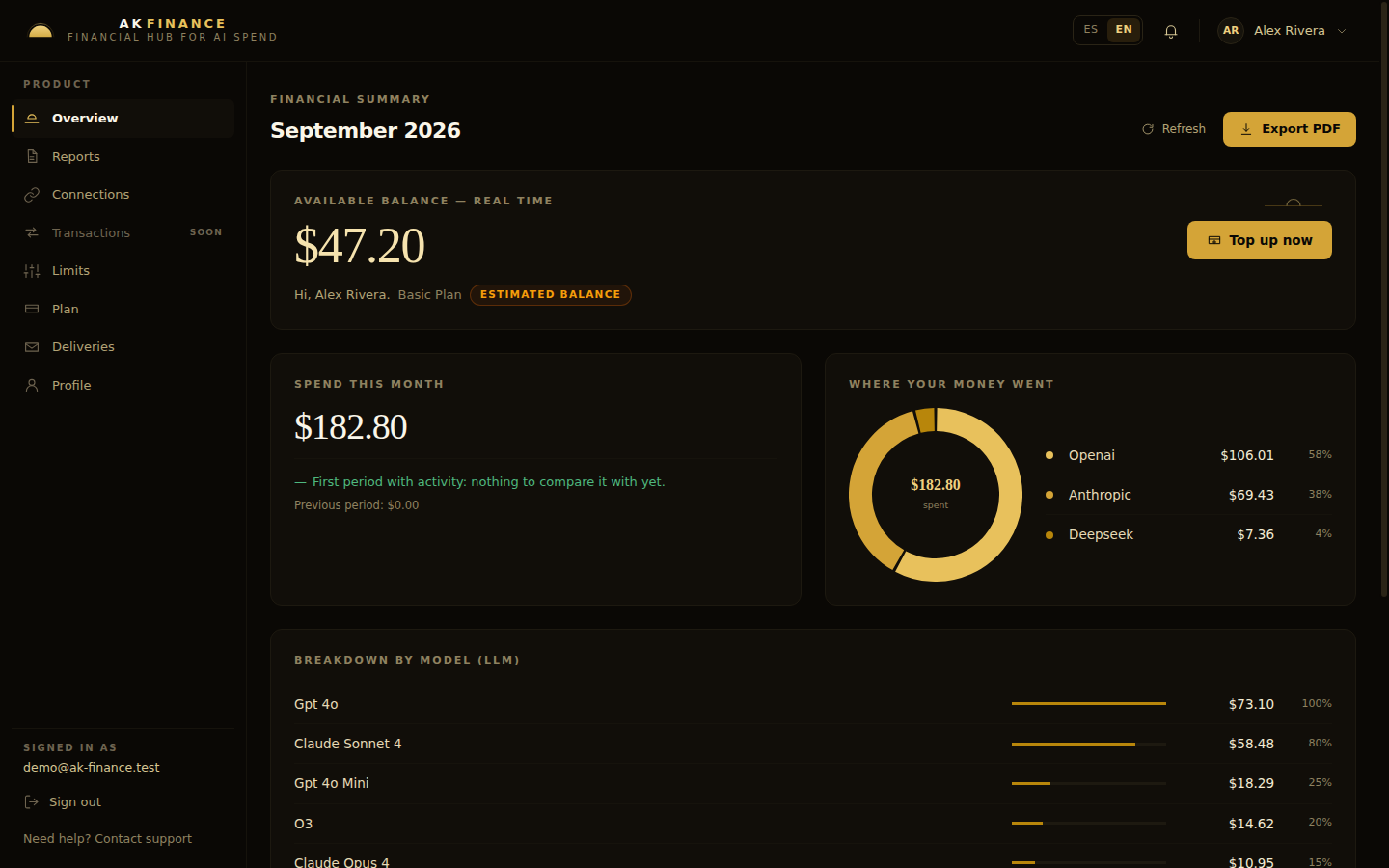
    The balance is read live from Stripe and marked as an estimate until the providers report what they charged. This is the period: what it cost, split by provider and by model, exportable as a PDF.

    Balance
    The dashboard: spend this month $182.80, previous period $0.00 and the top-up action.
    Spend for the period, with the previous period next to it for comparison.
    Where it went
    The same dashboard: the split by provider with the share each one took - OpenAI $106.01 58%, Anthropic $69.43 38%, DeepSeek $7.36 4%.
    What each provider took: OpenAI $106.01, Anthropic $69.43, DeepSeek $7.36.
Scroll sideways, or use the arrows.

Captures taken in the demo organization on seeded data, never on a customer account.

Seeded data · the report it found

In the demo organization the weekly report found $6.06 of spend that could be avoided: a model swap, with the price difference on the line. A recommendation never moves money, it only shows where it is going.

Entry points

Who it is for

One product, three ways in.

AK Dev · Unlimited

One account

For one developer paying for tokens out of their own pocket. Free to open, and a commission only when you top up.

AK Teams

A team

For a team leader who has to answer for the whole bill: one pool, a budget per seat and one report line.

AK Corporate

A company with several teams

For an organization running several teams: two report lines, no seat cap and one root account.

Boundaries

Controls and trust

What we do, what we refuse to do, and where your money sits.

We do not run AI models.

AK FINANCE is the money and control layer. Your prompts and responses never pass through us.

Your keys stay yours.

Each seat connects its own provider keys (BYOK). A key cannot spend until the team leader authorizes it, and it can be revoked.

Your balance lives in Stripe.

Top-ups are processed by Stripe and the balance is held in Stripe's customer balance; usage is reconciled against what each provider reports.

The stop is real.

A seat at zero budget cannot spend, and the block is not a badge on a report: the request is refused.

You own your data.

Account deletion removes your account and its data.

Where we stop

AK FINANCE is not a bank and does not provide financial advice. Top-up commissions and subscription prices are shown in the plans section below.

Terms and ConditionsPrivacy Notice

In the product today

What the product does today

The boundaries above are rules; this is what runs behind them in production right now. No date is offered as an argument.

01Eleven providers, one ledger
OpenAI, Anthropic, Google, DeepSeek and seven more connect with the keys you already pay for. Thirteen more are catalogued and switch on as their billing APIs open up.
02Reports to the inbox, PDF and CSV
Weekly to annual, for the team or the company, with the archive: every delivered report can be downloaded again.
03Hierarchical reporting
AK Teams reports one line; AK Corporate reports two, the consolidated organization and each team leader, with the seat detail underneath.
04Money movements you can follow
Every funding, assignment, transfer, charge and returned cent is written to a journal with the seat it touched.

11 providers live today

Connect the keys you already pay for. 13 more providers are catalogued and switch on as their billing APIs open up.

  • OpenAI
  • Anthropic
  • Google (Gemini)
  • DeepSeek
  • Meta (Llama)
  • Mistral AI
  • xAI (Grok)
  • Alibaba (Qwen)
  • Cohere
  • Perplexity
  • Inflection AI

Pricing

Plans and pricing

Four plans. Two for one person, two for a team or a company. Every price is in USD and every card goes straight to the real sign-up flow.

For individuals

Pay as you go

AK Dev

$0/month

Commission per top-up

5% → 2% per top-up

For one developer paying for tokens out of their own pocket. Open the account, load credit and watch where it goes.

  • 5% up to $100
  • 3% from $100 to $500
  • 2% from $500
  • Full dashboard, reports and recommendations

Free to open. The commission applies only when you top up.

Start free

Flat monthly

Unlimited

$25/month

Subscription, one price

0% per top-up

0% fee on every top-up. One flat monthly price.

  • 0% commission on every top-up
  • No credit ceiling
  • Same reports and recommendations

Worth it once you top up more than $1,250 a month.

Get Unlimited

For teams and organizations

Team leader

AK Teams

$49/month base

+ $15 per seat, per month

From $94/month · 3 seats minimum

3 seats = $49 + 3 × $15 = $94/month

For a team leader who has to answer for the whole bill. One pool, a budget per seat, and the team leader approves every key.

  • Per-seat budgets: assign and redistribute
  • The team leader approves every API key
  • One report line: the team, plus each member

The team leader takes a seat of their own.

Create your team

Organization

AK Corporate

$99/month base

+ $10 per seat, per month

From $199/month · 10 seats minimum

10 seats = $99 + 10 × $10 = $199/month

For an organization that runs several teams. No seat cap, no cap on team leaders, and two report lines: consolidated and per team leader.

  • Unlimited seats and team leaders
  • Two report lines: consolidated and per team leader
  • Approvals and seats run from one root account

The organization root account holds no seat of its own.

Create your organization

All four plans are available today: $49 base plus $15 per seat for AK Teams (3 seats minimum, so from $94/month) and $99 base plus $10 per seat for AK Corporate (10 seats minimum, so from $199/month). Signing up, creating the organization and checking out happen in the app.

Every plan gets the same dashboard, the same reports and the same hard stop. Plans change what the money costs, not what the product does.

Compare the four plans

Compare the four plans
Every price in USD, per month.AK DevUnlimitedAK TeamsAK Corporate
Monthly base$0 / month$25 / month$49 / month base$99 / month base
Per seat——$15 / month$10 / month
Minimum seats11310
Minimum monthly—$25$94$199
Top-up commission5% / 3% / 2% by top-up size0%0%0%
Report lines1: your own account1: your own account1 team line, plus each member2: consolidated and per team leader
Team budgets——Per seat, from the team poolPer seat, from any team pool
Key authorization——Team leaderTeam leader; root for orphan members
Who configures deliveriesYouYouTeam leaderOrganization root

Billing rules, before you buy

  • 0% commission on top-ups.
Start freeStart with AK Dev: it is free to open and you can move to Unlimited, AK Teams or AK Corporate later.

Questions

Questions we get asked

Short answers. Where the answer is a limit, we say so.

Does AK FINANCE run or resell AI models?

No. There is no model behind this product. We hold the money, apply the limits and reconcile what each provider reports; your requests still go straight to the provider you already use.

Where are my API keys stored, and who can use them?

Keys belong to a seat and are encrypted before they are stored. On a team, a key charges nothing until the team leader authorizes it, and it can be revoked at any time.

Where does my money actually sit?

In Stripe. A top-up is a payment processed by Stripe and the balance is held in Stripe's customer balance; the app reads it live and keeps the usage history on our side.

What happens when a seat's budget reaches zero?

That seat stops: the check happens before the request is forwarded, so a seat at zero cannot spend even if its key is still connected.

What happens if my subscription lapses?

Service pauses until the subscription is renewed. Your data, ledgers and reports stay intact, and everything resumes on renewal. The Terms and Conditions cover the details.

Which providers are supported today?

Eleven are live: OpenAI, Anthropic, Google (Gemini), DeepSeek, Meta (Llama), Mistral AI, xAI (Grok), Alibaba (Qwen), Cohere, Perplexity and Inflection AI. Thirteen more are catalogued.

What exactly is in the reports, and when do they arrive?

Spend by provider, model and seat for the period, delivered as a PDF and a CSV by email on the cadence you choose: weekly, monthly, quarterly or annual. Every delivery stays in the archive and can be downloaded again.

Can I change plans later?

Yes. You can change plans from the app at any time. The Terms and Conditions cover the details.

How do I cancel or delete my account and data?

From the app. Deleting the account removes the account and its data; you can also cancel a subscription without deleting anything.

Is there a plan with no monthly fee?

Yes: AK Dev has no monthly fee. You pay a commission only when you top up.

Put a ceiling on your AI spend.

Create the account, load credit and connect your first key.

Start free